
Hey folks, long time no see! Where last we left off, I had just finished a Bachelor’s degree at WGU. In February, I’ll be starting a Masters of Science in Cybersecurity and Information Assurance as well! In the mean time, my time at my previous job has unfortunately come to an end, and as such I’ve finally ramped up the job search in earnest.
I don’t think any reader needs my writing to know that the job market is in a sort of arms race right now – organizations use LLMs to screen applications, and job-seekers use LLMs to rapidly customize their resumes to perfectly fit job descriptions. Admittedly, I’ve done the same; I can only hand-tailor so many resumes and cover letters a day and not hear back, so I started trying out some of the online services for this. And they work well! The only complaints I had were the constant truth bending and invention of job experiences that I do not have, making me edit them by hand anyway… so why not build my own AI workflow, eliminating those snags?
Unfortunately, as much as I would love to train my own model, I do not have the GPUs to even think about that. (Who knew only playing decades-old games would hurt me in this way?) What I could do. however, was add a RAG layer to OpenAI – in short, add context (my professional history) to the massive firepower of a proper LLM. From there the workflow would be simple:
Upload job description -> Generate resume from my own data -> Render resume into PDF
To begin with, I had to create that context, or vector database, for OpenAI to give me a better response. I think the reason the online services hallucinate so often is that they’re only working from one or two base resumes. Over the past year, I’d hand-made dozens of resumes (including a “skeleton” with a long, detailed list of my accomplishments), so I set about transforming that data into JSON for easier ingestion. I probably could have used an LLM for this, but I love to reminisce, so I handled this step manually.
{
                "id": "lawfirm-sysadmin-6",
                "company":"Wouldn't You Like to Know LLP",
                "title":"System Administrator",
                "text":"Greatly reduced new user computer and account onboarding time by automating tasks with WDS, MDT, and Powershell",
                "confidence":"high",
                "skills":["automation", "PowerShell", "InTune", "MDT"]
}I went through all of my roles and accomplishments, and typed them out like above. Each “bullet” contained the actual text (the main ‘document’ to reference), had a unique ID for the vector database, the company name and role title for organization, and “skills” metadata points to help with even more context. In addition, this file “resume_data”, contained all of the static information that would go on all of my resumes like name, portfolio links, education, certifications, etc.
With the data creation out of the way, I then created a collection via Chroma – this collection serves as the vector database, and is where OpenAI gets the additional context from. Loading the collection is simple – walk through all of bullets, make a list[] with the ID, document, and metadata, and let the embedding agent do the magic:
for resume in data["resumes"]: #step through resumes
    resume_id = resume["resume_id"]

    for bullet in resume.get("bullets",[]): #load each bullet if it's labelled
            text = bullet.get("text")
            if not text:
                    continue

            company = bullet.get("company")
            title = bullet.get("title")

            role = role_lookup.get((company, title), {}) #set role via lookup table

            documents.append(text) #append actual bullet text

            skills = bullet.get("skills",[]) #convert skills dict to comma joined list
            skills = ", ".join(skills)

            metadatas.append({ #append metadata
                    "candidate_name": candidate["name"],
                    "resume_id": resume_id,
                    "company": company,
                    "title": title,
                    "dates": role.get("dates",""),
                    "skills": skills,
                    "confidence":bullet.get("confidence","neutral"),
                    "focus": resume.get("focus","")
            })

            ids.append(bullet["id"])

    #add to collection
    try:
        collection.add(
            ids=ids,
            documents=documents,
            metadatas=metadatas
        )
    except Exception as e:
          print(f"Error occured: {e}")
traceback.print_excI have to admit, getting Chroma to work correctly was an incredible pain – I’ll spare you the hours-long troubleshooting of segfaults and traceback exception codes, and leave you with the real protip: don’t attempt to run Chroma in memory. Run it as a container and connect via HTTP client. I promise, the latency is worth the trade.
Now that context was locked and loaded, the next task was prompting OpenAI to parse job descriptions, then wordsmith my original resume data into skills and experiences aligned to that description. I went with two separate prompts (see their full text on GitHub here); the first parses the job description, which was the easy part. While experimenting with results, token sizes, etc, I learned that to keep costs down I should really query the collection on its own instead of passing all of my job history to GPT. The workflow now looked like this:
Parse job description -> Send “skills” from description to collection -> Return most relevant bullet points-> Send to GPT
From there, the second prompt uses the job requirements and the bullets from the collection to generate a professional summary, remixed experience bullets, and short Skills that target ATS keywords that were not covered by the bullets (gotta get past that screening, after all). This part worked great, but it did leave me with a problem: by rewording the bullets, they lost their association with the role that they came from.
To solve this issue, I took the new bullets and fed them back to the collection as a query, but only had the collection return the top result. This effectively told me which original bullet the new one lined up with best – it was a little fuzzy around the edges but it wound up working quite well! By looking at the genesis bullet, I was able to tie the new bullet to the original’s metadata, and therefor its role. Once each bullet had an identified role, it was easy to walk through them and get them sorted into their roles for the new resume.
Hooray! We’re done with the hard part!
I wish. I’m mainly looking for jobs in infosec since that’s what I’ve been doing the past several years, while my previous roles were more generalist sysadmin and help desk. If I only look for jobs that are aligned with one of my roles, the genius LLM only returns bullets from one role, and that’s going to look really odd to a hiring manager. It looked even more odd to have 11 bullets for one role and then only one bullet for another! This turned into quite the problem – I tried to fix it with AI but trying to force it to use a specific amount of data from specific roles really degraded its ability to make good bullets, so I went old-school to fix the issue.
Going Old-School
After the “experience” block was generated, I passed it to a method to force at least three “roles”, and to force at least four “bullets” for each. I did not use AI for this, but simple walked through the original data and drew it directly. It did kind of feel like a cop out, but for my use-case it made sense: I was running into this issue because my most recent role had sufficient coverage already, so I really just needed filler. Trying to squeeze blood from a stone would have been fruitless.
I did run into one more interesting issue here though, and that was re-using bullets. Because this section wasn’t context aware, there was a decent chance that similar bullets from the raw original data would appear. To remedy this, I looked back to the “skills” metadata I used to populate the vector database in the first place. Similar bullets should have an overlap in skills, so by adding skills to a list as they were being backfilled, I could prevent overlap.
#now add bullets for each role until we have enough, skipping ones with overlapping skills
for role_title, role_block in experience.items():
    role_block.setdefault("experiences",[])

    bullets = role_block["experiences"]
    used_text= set(bullets)
    used_skills = set()

    #add fillers matching the role, skipping previously used fillers and overlapped skills
    for candidate in role_index.get(role_title, []):
        if len(bullets) >= min_bullets:
            break

        text = candidate["text"]
        skills = set(candidate.get("skills", []))

        if text in used_text:
            continue

        if skills and (skills & used_skills):
            continue

        bullets.append(text)
        used_text.add(text)
used_skills |= skillsThe experiences, skills, and professional summary were the bulk of the work, as they were the ones being generated by OpenAI. In order to render a proper resume, I still needed the static content, which, as mentioned before, was also saved in the resume_data JSON. This part was a no-brainer, I created a method to load that static content, and put it at the front of the new “resume” JSON object. By appending the AI-generated objects to it, I now had a full resume in JSON form!
Rendering the Resume
WIth the data done, I looked to the templating engine Jinja to create a web page based on the JSON content. I’d used Jinja when building a front-end for my IPv4 -> IPv6 project in my previous role, so I wasn’t completely unfamiliar with it, but getting to know how to use ifs and for loops was a fun sidequest! It really is amazing how well it works to iterate through JSON data.
{% for key, role in resume.experiences.items() %}
<div class="experience">
    <div class="experience-title">
        {{ role.title }} — {{ role.company }}
    </div>
    <div><em>{{ role.dates }}</em></div>
    <ul>
        {% for bullet in role.experiences %}
        <li>{{ bullet }}</li>
        {% endfor %}
    </ul>
</div>
{% endfor %}I never feel like I’ve truly learned a tool until I’ve done some good nested-for loops, personally.
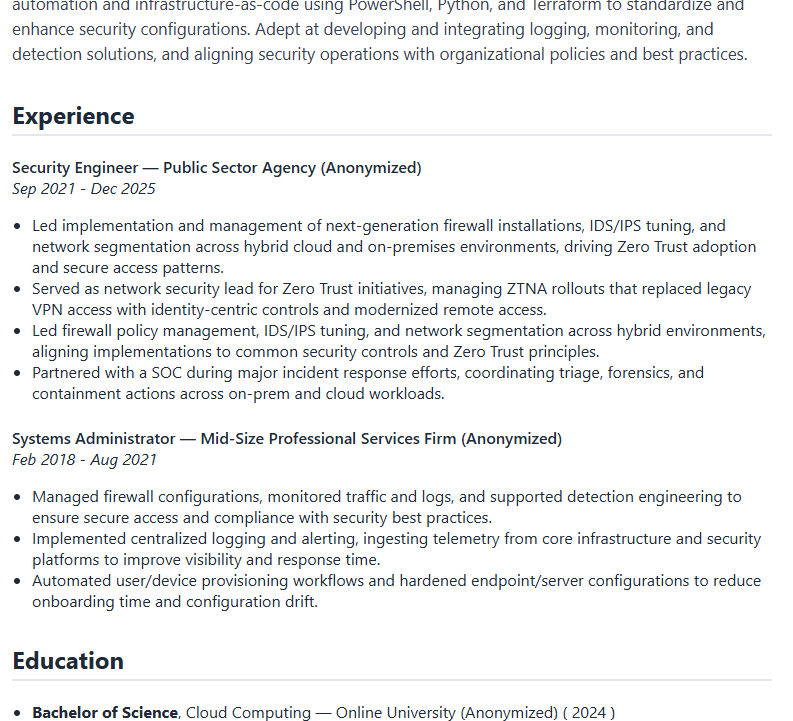
From here, I put my sweet CSS skills I gained at WGU to use, and somehow made it look like a passable resume! I’ve run it side-by-side with some commercial AI resume generators out there, and I think it really holds its own. It’s not quite as easy to use as some of them, but it is certainly more accurate and less prone to inventing experiences and knowledge for me. I’ll probably wind up using it for the next week or so to see how well it stacks up, but at the very least, I learned a lot!
Full project available on GitHub: https://github.com/pmalley130/resume-builder
Little generous on the hairline of the avatar, eh? 🤣
Ok, maybe the avatar is based on me from 10 years ago. Who hasn’t had their hairline move back?!