
Sometimes a short project hits you like a bolt of divine inspiration, and sometimes it hits you because you’re frustrated at your own failings and think there must be a programmatic fix for them. I started this as the latter, but I’ve since found peace with my failings since this didn’t really help it at all. In spite of that, I still feel this was a cool and useful project for other reasons.
WaniKani is a flashcard/spaced repetition system for learning Japanese. It builds from radicals, to kanji, to vocabulary. When a “card” comes up, you get prompted to either type in how the characters or word is pronounced, or its meaning/mnemonic. If you get a term correct, it will take longer for it to pop up in your reviews again, hence the “spaced repetition system”. If you get it incorrect, the timer restarts for that term. Once you’ve gotten a term correct a certain amount of times in a row you’re considered a “guru” – guru enough terms and you unlock the next level.
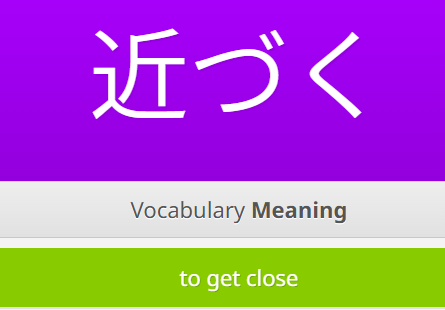
My frustration stemmed specifically from the vocabulary terms. I’ve been consuming Japanese pop culture for, well, a long time, and I have a decent handle on the language to start with, but reading has always been my weak point. In spite of that additional baggage knowledge, I found myself getting things wrong that I definitely knew, my definition was just slightly different from the way that WaniKani specifically wanted. They plan for this, though, and have a field where you can add your own synonyms!
I grumbled a bit every time this happened, but if I got the same term “wrong” multiple times, I’d add my own synonymical definition. As the vocabulary piled up, it went from a minor annoyance to upsetting me an embarrassing amount. So I did what anyone would do – I tried to think of a way to make it easier instead of just getting better!
Concepts of a Script
WaniKani famously does not have any official apps. Tofugu, the parent company, consists of two people, so they have chosen to focus on their learning content and web application (which works just fine on mobile browsers). To offset this, they provide an API and blanket permission for anyone who wants to make an app, provided that they respect the paid subscription limitations.
My problem was primarily with vocabulary terms and not the radicals or kanji – obviously it doesn’t make sense to go through the nearly 7000 vocabulary that I couldn’t already read to determine if I needed to add synonyms. So instead, the plan was to use a JP -> EN dictionary to look up the terms and programmatically add dictionary definitions to the user synonyms section. It should be a pretty simple script:
get terms from wanikani API -> look up definitions from dictionary API -> compare definitions -> push new definitions to wanikani api
Finding a Dictionary
There are a ton of nerds out there learning Japanese, which means a ton of tools have been created to help with the language learning journey. And yet, no simple JP -> EN dictionary API! My JP dictionary of choice for the last decade+ has been Jisho.org, and while they do technically have an API, it is “not very good” by their own admission, and the only docs available are from that same thread (that hasn’t been updated in years). I did find a python package that scrapes Jisho and works as a de facto API, but there had to be a better way for this.
As it turns out, Jisho itself is primarily built on an open source dictionary named JMDICT. JMDICT is widely available as an XML document with some custom fields, but luckily for my own sanity, someone regularly parses the XML and repackages it as JSON on GitHub. With a dictionary sourced and downloaded, the next step was to grab the information I needed from it to build a lookup map. The JSON itself is just over 214k entries, weighing in around 100MB – large, but not too large to scan and build an index consisting of only term:[definitions] from to save to a pickle, or so I thought.
{
  "id": "1242170",
  "kanji": [
    {
      "common": true,
      "text": "近づく",
      "tags": []
    },
    {
      "common": true,
      "text": "近付く",
      "tags": []
    }
  ],
  "kana": [
    {
      "common": true,
      "text": "ちかづく",
      "tags": [],
      "appliesToKanji": [
        "*"
      ]
    },
    {
      "common": false,
      "text": "ちかずく",
      "tags": [
        "ik"
      ],
      "appliesToKanji": [
        "近付く"
      ]
    }
  ],
  "sense": [
    {
      "partOfSpeech": [
        "v5k",
        "vi"
      ],
      "appliesToKanji": [
        "*"
      ],
      "appliesToKana": [
        "*"
      ],
      "gloss": [
        {
          "lang": "eng",
          "gender": null,
          "type": null,
          "text": "to approach"
        },
        {
          "lang": "eng",
          "gender": null,
          "type": null,
          "text": "to draw near"
        },
        {
          "lang": "eng",
          "gender": null,
          "type": null,
          "text": "to get close"
        }
      ]
    },
    {
      "partOfSpeech": [
        "v5k",
        "vi"
      ],
      "appliesToKanji": [
        "*"
      ],
      "appliesToKana": [
        "*"
      ],
      "gloss": [
        {
          "lang": "eng",
          "gender": null,
          "type": null,
          "text": "to get acquainted with"
        },
        {
          "lang": "eng",
          "gender": null,
          "type": null,
          "text": "to get closer to"
        },
        {
          "lang": "eng",
          "gender": null,
          "type": null,
          "text": "to get to know"
        }
      ]
    }
  ]
}Long story short, I tried several times to extract just the terms from the dictionary. I let it my script run for several hours and it appeared to hang, so I added some console output. The script was certainly adding terms, so I let it run overnight.. and it crashed. The next morning I realized how dumb I was being – I’m only going to need about 7000 of these for WaniKani, why would I ever build an index with 214k?
The WaniKani API
The next step would be to hit the WaniKani API to get that list of 7000 terms. WaniKani has fantastic API docs, gratefully. Furthermore, getting the full list of vocab was as easy as hitting the subjects endpoint with the types parameter set to vocabulary. The API only return 1000 items at a time, but helpfully includes a next_url object when the results are paginated, so extracting all of them was a matter of doing a loop until that object is null.
    url = base_url
    #if it's over 1000 entries it paginates, so need a loop
    while url:
        response = requests.get(url, headers=headers,params=params).json()

        #extract vocab from response
        for item in response.get("data",[]):
          """
            logic for extracting vocab
          """
        #follow pagination due to 1000 api limit
url = response.get("pages", {}).get("next_url")Originally, this was built to grab a list of actual Japanese characters to send to the dictionary data to build a lookup index, so all I had it do was get the actual 日本語 from the terms (if I have to type ensureAscii=false one more time I might sob) and put them in an array, which worked great. By iterating over that array and searching the JMDICT data I was able to build an easy index to lookup a Japanese term and get its dictionary definitions. The performance was acceptable too – the list of 7000 terms took under a minute to build. I’m sure there was a more performant way to handle this, but at this scale it was absolutely fine.
With the more simple index in hand, I was ready to look up the words on WaniKani again to compare their definitions and add dictionary definitions where needed, or so I thought. As it turns out, there’s no way to send Japanese to the WaniKani API and get the term you’re looking for back. The website supports a search so I had incorrectly assumed that the API would as well – in hindsight it makes sense that it wouldn’t, this is for building tools.. not a dictionary. Instead, to get a specific term’s meaning you have know the term’s ID, so you can hit the subject/<id> endpoint.
This put me at a crossroads. The simple fix would be to just add the subject id to the existing index when I do the whole vocab query, then query the ID endpoint when needed for the definitions. This doubles my GETs though, and on the other hand, caching the information is both performant and good manners. Ultimately, I decided to save the whole vocab list to a pickle to not have to get any more for now. The pickle was just a list of the vocab objects; from that, I built a list for each item with the term, subject ID, and definition (from the dictionary, not WaniKani).
Dealing with Definitions
I knew that JMDICT holds definitions in an object named glosses[], but how does WaniKani? I’d need to look at WaniKani definitions, compare them to the dictionary definitions, and then add the delta back. I knew from using WaniKani that the definitions on the page weren’t necessarily the only definitions, and now I had the raw data from WaniKani to look at, so it was time to examine what was there:
{
   "id": 3434,
   "object": "vocabulary",
   "url": "https://api.wanikani.com/v2/subjects/3434",
   "data_updated_at": "2025-11-18T14:31:49.951360Z",
   "data": {
      "created_at": "2012-07-22T23:28:45.447595Z",
      "level": 8,
      "slug": "近づく",
      "hidden_at": null,
      "document_url": "https://www.wanikani.com/vocabulary/%E8%BF%91%E3%81%A5%E3%81%8F",
      "characters": "近づく",
      "meanings": [
         {
            "meaning": "To Get Close",
            "primary": true,
            "accepted_answer": true
         },
         {
            "meaning": "To Approach",
            "primary": false,
            "accepted_answer": true
         },
         {
            "meaning": "To Draw Near",
            "primary": false,
            "accepted_answer": true
         },
         {
            "meaning": "To Near",
            "primary": false,
            "accepted_answer": true
         },
         {
            "meaning": "To Bring Near",
            "primary": false,
            "accepted_answer": true
         }
      ],
      "auxiliary_meanings": [
         {
            "meaning": "To get near",
            "type": "whitelist"
         }
      ],
      "readings": [
         {
            "reading": "ちかづく",
            "primary": true,
            "accepted_answer": true
         }
      ],
      "parts_of_speech": [
      ],
      "component_subject_ids": [

      ],
      "meaning_mnemonic": "",
      "reading_mnemonic": "",
      "context_sentences": [
      ],
      "pronunciation_audios": [
         {
            "url": "https://files.wanikani.com/8v7c4dzigsg39t9gkkcy75bods9r",
            "metadata": {
               "gender": "female",
               "source_id": 27780,
               "pronunciation": "ちかづく",
               "voice_actor_id": 1,
               "voice_actor_name": "Kyoko",
               "voice_description": "Tokyo accent"
            },
            "content_type": "audio/webm"
         },
         {
            "url": "https://files.wanikani.com/hckcnwjnyw2ridxwv6sxd9l3fxfc",
            "metadata": {
               "gender": "female",
               "source_id": 27780,
               "pronunciation": "ちかづく",
               "voice_actor_id": 1,
               "voice_actor_name": "Kyoko",
               "voice_description": "Tokyo accent"
            },
            "content_type": "audio/mpeg"
         },
         {
            "url": "https://files.wanikani.com/hrc80byni6fy1sbuglr2r19djl02",
            "metadata": {
               "gender": "male",
               "source_id": 10900,
               "pronunciation": "ちかづく",
               "voice_actor_id": 2,
               "voice_actor_name": "Kenichi",
               "voice_description": "Tokyo accent"
            },
            "content_type": "audio/mpeg"
         },
         {
            "url": "https://files.wanikani.com/cuhicrkl260gnf7kecat1yoxvayi",
            "metadata": {
               "gender": "male",
               "source_id": 10900,
               "pronunciation": "ちかづく",
               "voice_actor_id": 2,
               "voice_actor_name": "Kenichi",
               "voice_description": "Tokyo accent"
            },
            "content_type": "audio/webm"
         }
      ],
      "lesson_position": int,
      "spaced_repetition_system_id": 1
   }
}Please note that I have removed data from the above snippet that is protected intellectual property of Tofugu/WaniKani.
Looking at the above format, WaniKani actually has two fields for definitions: meanings, and auxiliary meanings. I’m not sure what the difference is on the backend, but to grab the WaniKani definitions I just had to look up the item from the pickle and add the definitions to a simple array:
wanikani_definitions = []
data = item.get("data",{})
meanings = [m["meaning"] for m in data.get("meanings",[]) if m["accepted_answer"]]
auxiliary_meanings = [m["meaning"] for m in data.get("auxiliary_meanings",[]) if m["type"] == "whitelist"]
wanikani_definitions = meanings + auxiliary_meaningsSweet! I hammered out some code to compare the sets of definitions and to add the needed ones to the user synonyms field in the WaniKani object and.. wait. Where the hell are user definitions stored? There’s absolutely nothing in the subjects data that describes that!
The WaniKani API Part 2: User Content
Naturally, user created content can’t be stored at the same endpoint as the real learning text, so WaniKani uses a whole different endpoint: study_materials. Each “study material” has a field for subject_id, which ties it back to the original term, and each original term can only have one study material (per user). Creating a study material is very simple, but because each term can only be assigned once, I have to map every study material to the vocab list before I do anything else. I might as well just build my own objects from the start! Welp, time for a new workflow:
get study materials from wanikani -> get vocab terms from wanikani -> map study materials to terms -> get definitions from dictionary -> compare definitions -> add delta via API
I kept all of the working data in one big block, and just added information to it as I went. This new workflow worked great, I just had some more peculiarities to handle. For instance, if user synonyms already exist for a term, a PUT doesn’t add on top, it only adds the new definitions. Logic is needed to add the new definitions on top and send the whole new array. Similarly, there were some otherwise unknown limits on user synonyms: each term can have a maximum of 8, and they can only be 64 characters long. Nothing too tricky, but it definitely took some trial and error to get there!
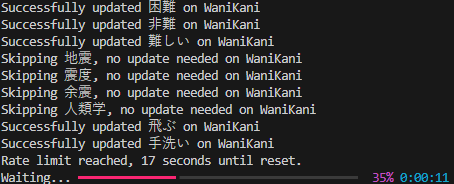
From there, it was mostly performance improvements. The WaniKani API limits users to 60 requests per minute, but API responses include fields that tell you both how many requests you have left and how much time you have left. With these, I built a wrapper for requests to handle naturally backing off at the limit. But why make a request if you’re not updating anything in the first place? I also built logic to add an update flag to my big block of data, and only go through with an update if it’s needed.
#check existing wanikani definitions (and user synonyms) against dictionary definitions to add more user synonyms
def update_definitions(index:list[dict]) -> list[dict]:
    for entry in index:
        #can't iterate over None, have to make it empty list instead
        if entry.get("study_material_definitions") is None:
            entry["study_material_definitions"] = []

        #normalize case
        wani_defs = {w.lower() for w in entry.get("wanikani_definitions",[])}
        synonyms = {s.lower() for s in entry.get("study_material_definitions",[])}

        additions = [] #for tracking to see if we need to update on wanikani

        #walk through dictionary defs and add if not already represented
        for definition in entry.get("dictionary_definitions",[]):
            #API allows a max of 8 user synonyms, break the loop early if we're there
            if len(entry["study_material_definitions"]) >= 8:
                break

            if definition.lower() not in wani_defs and definition.lower() not in synonyms:
                entry["study_material_definitions"].append(definition)
                synonyms.add(definition.lower())
                additions.append(definition.lower())

        entry["update_wanikani"] = bool(additions) #create boolean flag for updating wanikani
return indexThe End Product
At this point, I was pretty proud of it, and decided I wanted to post about it at the very least, so I added several usability improvements. I turned it into an interactive script that asks which levels of vocab you want to focus on (and removed the pickle index because the smaller size makes it a waste), added error handling for missing environment variables, helpful output as the script runs, and a prompt for the user to review sample output before making the changes on WaniKani.
Below is an excerpt from the final output, before being pushed to WaniKani. wani_kani_definitions and dictionary_definitions are from the lookups, and study_material_definitions should be the delta of those two (plus whatever was custom made by the user). id and term are self explanatory, while update_wanikani is the boolean mentioned above to determine whether or not a push to WaniKani has to be made.
{
        "id": 4122,
        "term": "祈る",
        "study_material_id": null,
        "study_material_definitions": [
            "to say a prayer",
            "to say grace",
            "to hope"
        ],
        "wanikani_definitions": [
            "To Pray For",
            "To Pray",
            "To Pray For Something",
            "To Wish",
            "To Wish Something",
            "To Pray That"
        ],
        "dictionary_definitions": [
            "to pray",
            "to say a prayer",
            "to say grace",
            "to wish",
            "to hope"
        ],
        "update_wanikani": true
    }
Will it stop me from getting things wrong? Nope! It’s barely helped at all! But it does allow me to see even more definitions for terms, which is pretty sweet. Especially the more colloquial ones! I’m glad I undertook the project, even if it forced me to reckon with the fact that I know less Japanese than I wish I did. Only one way to fix that! I’ve since come to realize that getting things wrong on WaniKani is ok, it just reinforces the knowledge that much better. It truly is a feature of the spaced repetition system.
The completed script is available on my GitHub.
This will likely be my last post for a while, since I start my Master’s program in about a week! I’ll be sure to write about that when I finish, if not sometime during the program.